How to Catalogue a Stamp Collection and Track Its Value
A digital inventory of your stamp collection gives you an overview of which stamps you own, how much you paid for them, what their catalogue value is and what their current estimated market price is. With a larger collection it also makes sorting, searching, updating prices and deciding which stamps to keep, sell or study further much easier.
At Znamky.cz we have now significantly improved the section for keeping a digital record of your collection. Every registered user has a Collections & exhibits section in their account — a digital catalogue that handles photos, AI recognition, catalogue numbers, purchase prices, folders, bulk edits and statistics on how your collection's value develops.
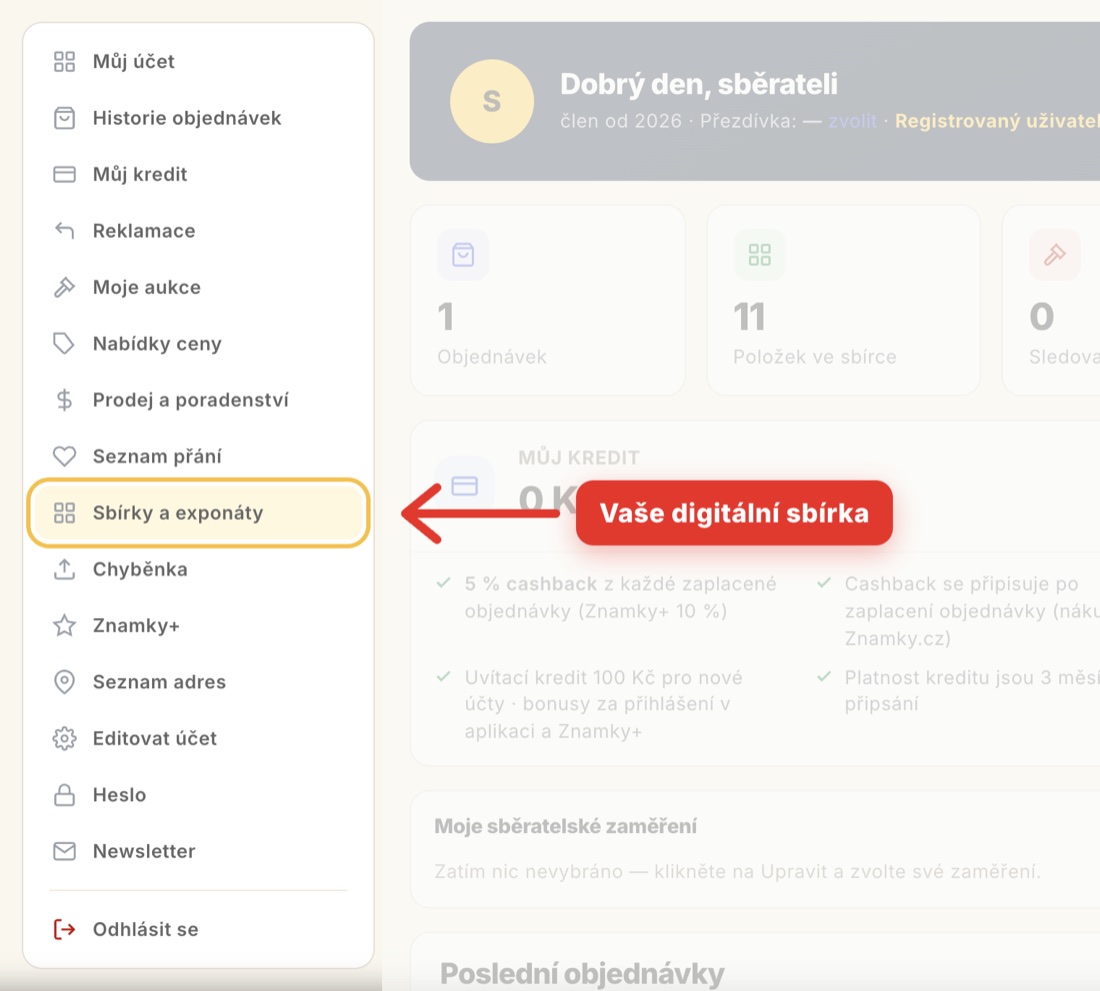
We have tried to make keeping such a record as easy as possible. You are helped by AI recognition that can handle several stamps in a single photo, and by one-click import of your purchases — so you do not have to copy items out by hand.
The best digital inventory does not mean filling in every detail for every stamp by hand. It is more efficient to combine automation, AI and manual checking according to how important or valuable a particular item is.
What is the best way to catalogue a stamp collection?
A good digital inventory should let you record at least the following for each stamp:
- country or area of issue,
- catalogue and catalogue number (on Znamky.cz Pofis, Michel, Stanley Gibbons, Scott and Yvert; for banknotes Pick and Bajer),
- a photo of the stamp,
- condition and quality,
- purchase price and purchase date,
- catalogue value,
- estimated market price,
- optionally a note and the source — where the stamp came from and how you acquired it,
- the folder it belongs to.
Not all details have to be filled in straight away, though. With a large collection it is often more efficient to create a basic record first and add the details gradually.
Above all, start with your most valuable items and only then move on to the less valuable ones. That is where an accurate record makes the most sense — and if you only get to the cheaper pieces later, you will not miss anything important.
Three different prices worth distinguishing
We recommend recording above all purchase prices — and, if you sell a stamp, the selling price as well. This lets you easily track the return on your investment. After a few years you simply will not remember what you paid, and a digital collection is a practical helper here.
When cataloguing a collection, however, three different values are often confused:
Purchase price is the amount you actually paid for the stamp.
Catalogue value is the value listed in the relevant catalogue. It serves mainly as a guide and a point of comparison.
Estimated market price is the approximate amount for which the stamp could realistically be sold at a given moment. It depends on condition, rarity, demand, the specific variety and the current market situation, among other things.
Catalogue value therefore does not automatically mean the actual selling price. That is why, in a Znamky.cz collection, each of these three amounts has its own field and its own currency — and the value of the collection is calculated from your estimate, not from the catalogue.
Do not spend the same time on every item
With a large collection it is not efficient to give every stamp the same attention. The time spent on cataloguing should match the importance and value of the item.
It makes sense to record your most precious and expensive stamps in as much detail as possible. For cheaper and common items, on the other hand, use as much automation and AI as you can.
Record details for your most valuable stamps
For rare or expensive items it is worth recording, for example:
- the exact catalogue number and catalogue,
- a good-quality photo,
- the condition of the stamp,
- perforation and watermark,
- the number of stamps in miniature sheets and souvenir sheets,
- the set and year of issue,
- purchase price and purchase date,
- catalogue value,
- estimated market price,
- source — auction, stamp fair, a specific seller,
- and everything else that belongs to the item in the note: variety or deviation, provenance, expert certificate, prices realised for similar pieces.
For such items AI is a useful helper, but the final check should be done by the collector.
Let AI handle as much of the cheaper stamps as possible
For common and cheaper stamps there is usually no need to spend several minutes entering each detail by hand.
The following can help, for example:
- recognising a stamp from a photo,
- cutting up one photo containing several stamps and recognising each one separately,
- automatic assignment of country and catalogue number,
- importing items from completed purchases,
- bulk edits,
- filtering and sorting.
A basic record can thus be created within seconds, and you can add more detailed information later – for example only for stamps that turn out to be more interesting.
A simple rule: The higher the value or importance of an item, the more time you should spend checking it by hand. The more common and cheaper the item, the more work you can leave to AI and automation.
| Item type | Recommended way of cataloguing |
|---|---|
| Rare / very valuable stamp | Detailed manual record, photo and checking |
| Valuable stamp | AI as a helper + manual checking |
| Common collectible stamp | Photo + AI + basic check |
| Cheap / bulk item | Maximum automation and bulk operations |
How to start digitising your collection?
If you have hundreds or thousands of stamps, there is no need to digitise everything at once.
A practical approach could be:
- Divide the collection into larger groups – for example by country or period.
- Start with the most valuable items.
- Take photos of the stamps — you do not have to photograph each one separately. Photograph a whole album page and AI will cut it up into individual stamps by itself.
- Let AI recognise each item and fill in the country and catalogue number; for doubtful pieces a catalogue will help.
- Check that the identification is correct.
- Add the purchase price and date.
- Sort the stamp into the appropriate folder.
- For more valuable items, also add the condition, catalogue value and estimated market price.
- For common items, carry on with as much automation as possible.
This way you avoid spending weeks entering cheap stamps by hand and never getting to the most interesting pieces at all.
How to organise a digital stamp collection?
It is a good idea to divide a digital collection in a similar way to a physical one. In your inventory, a folder is what an album or stock book is in real life — and collections are most often sorted by:
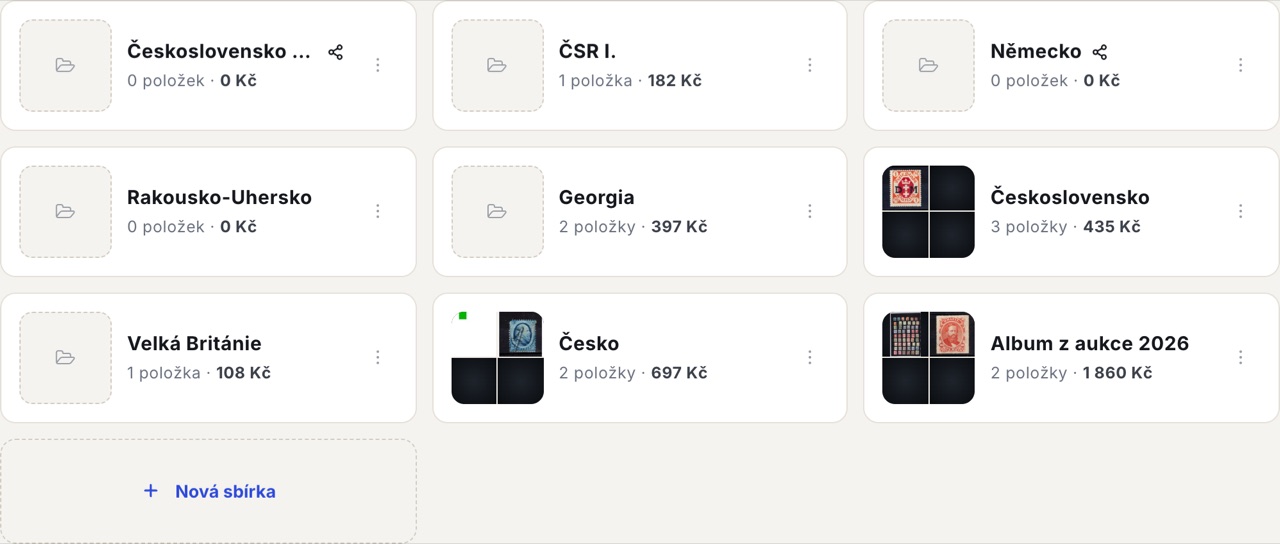
- country,
- period,
- catalogue,
- theme,
- how the items were acquired,
- or purpose.
Folders on Znamky.cz sit on a single level, so instead of nesting them you put the connection into the name:
Czechoslovakia I — Hradčany · German Reich 1920–1930 · Austria-Hungary
If you have already uploaded your items, you do not have to create folders by hand. Bulk edits include the option Split by country, which goes through the selected items and creates a folder for each country. The names are matched against the official list of countries, so you will not end up with separate folders for "ČSR" and "Czechoslovakia".
Folders do not have to copy the catalogue
A digital environment also lets you build your own logic for the collection. You can have separate folders such as:
- My best stamps
- For sale
- To identify
- New additions
- Stamps from auctions
- Family collection
- Investment items
Each item always belongs to exactly one folder — but you can move it between folders at any time, even in bulk. And if you want an additional thematic selection without taking the item out of its folder, use the Exhibits tab: exhibit pages are put together from items you already have in your collection, so you do not enter them twice.
How to get hundreds of stamps into a digital inventory?
For a larger collection there are five main ways.
1. Manual entry
The simplest method for a few dozen stamps or for items you want recorded as precisely as possible. The form is split into two tabs — Basic info and Details — so you do not have to wade through everything at once.
Manual entry makes the most sense above all for rare, expensive or otherwise significant items.
2. Photos and AI
You photograph the stamp and AI tries to determine its basic details. You can upload either a single stamp or a whole album page — AI cuts it up and recognises each stamp separately.
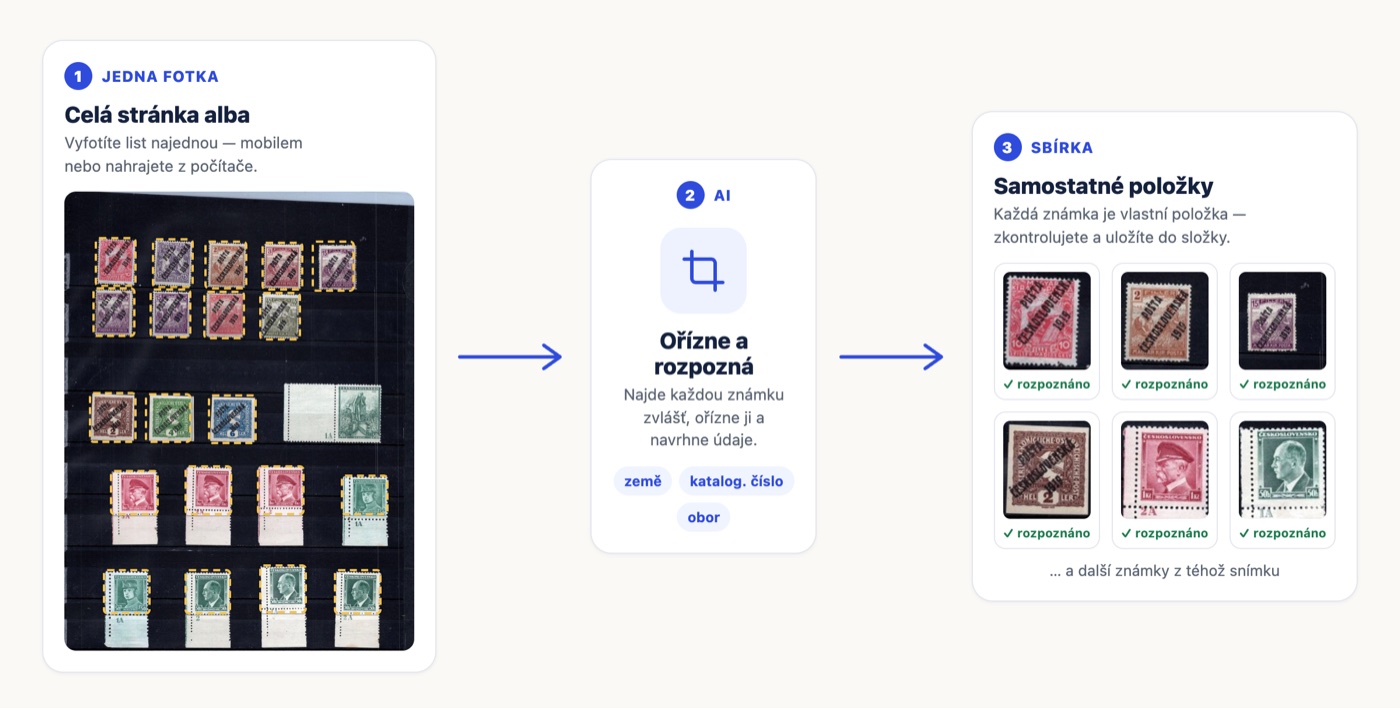
This is very efficient especially for large numbers of common items. Instead of copying details from a catalogue, you can start with a photo and then simply check the result.
AI is not, however, a reason to skip checking valuable stamps. With similar issues there can be differences in shade, paper, perforation, overprint type or another variety, for example.
3. Importing purchases
If you buy stamps from us, it is more efficient to take the data straight from your purchases than to enter it again by hand. The import covers only orders from our own selling profiles — that is, purchases on Znamky.cz, from our seller STAMPS on Aukro and, where applicable, from our accounts on Catawiki and eBay. Purchases from other sellers on these platforms will not be loaded here; you can record those manually, by photo or by importing a spreadsheet.
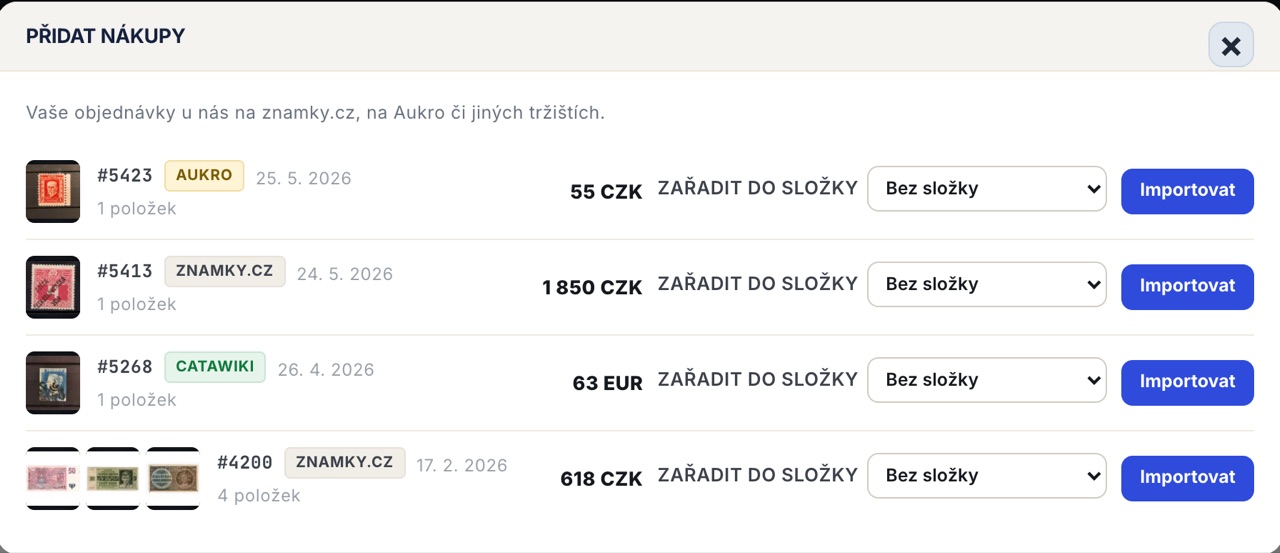
The Add purchases button next to "Add Item" finds your orders with us linked to your account's e-mail address. For each one you will see thumbnails of the pieces you bought, the date, the amount, the order number and a badge showing the platform through which you bought from us, and you choose a target folder for each order separately.
The order transfers the name, catalogue and catalogue number (recognised from the product code), country, purchase price in the order currency, photo, source and, above all, the actual purchase date. This matters for tracking how your collection's value develops later: an order from 2023 will appear in the charts under 2023, not on the day you imported it.
What is more, each order can only be imported once — if you click it a second time, the items will not be duplicated.
4. Import from a spreadsheet (CSV or XLSX)
If you already keep your collection in Excel or another spreadsheet, you do not have to retype the data. A template is available for download in both CSV and XLSX format — just transfer your data into it and upload the file. Before importing, it is a good idea to standardise country names, catalogue numbers, currencies and other details.
5. Import from Colnect
If you keep your collection on Colnect, you can upload its export file directly.
How to record stamp prices?
For each stamp it is useful above all to keep the purchase price. You can also fill in further price information — your own estimated market price or the catalogue value from the catalogue, and when you sell, the selling price too.
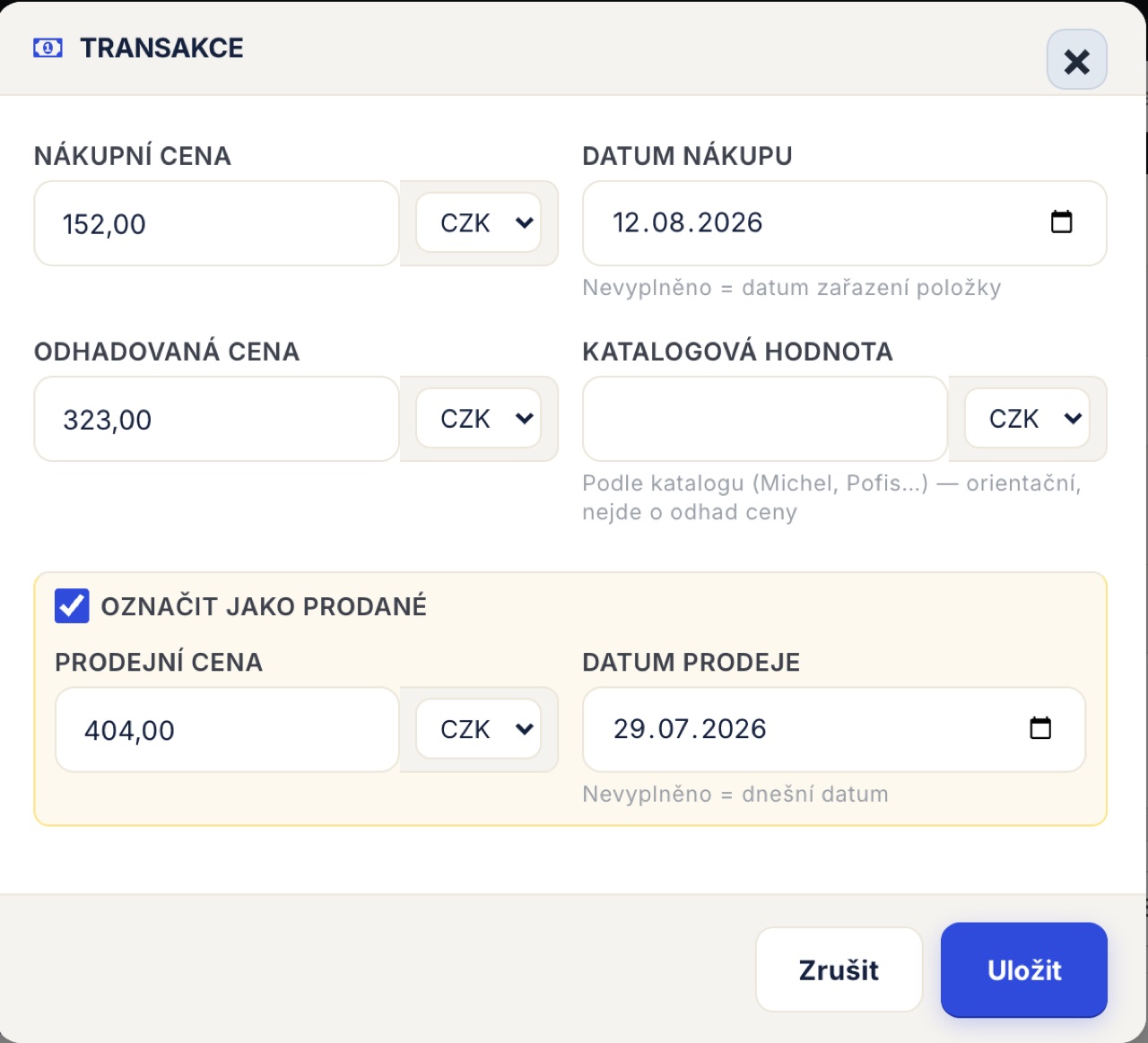
The purchase price goes together with the purchase date. If you do not fill it in, the system assumes you bought the item at the moment you added it to your collection. For older purchases it is therefore a good idea to add the date manually — otherwise it will only show up in the collection growth charts on the day it was added.
This lets you find out later:
- how much you have invested in your collection in total,
- how much you have spent on individual countries or periods,
- how the value of individual parts of the collection is changing,
- which purchases were the most successful,
- or what the difference is between the purchase price and the current estimated market price.
With purchases in different currencies you do not need to convert anything: each amount — purchase, estimate, catalogue value and sale — has its own currency. The one you have set in the shop is pre-filled, so you enter a Delcampe purchase in euros and a domestic auction in Czech korunas. Summaries and charts are then converted into the main currency using the shop's exchange rates, so a purchase in euros and a sale in korunas give the correct profit.
Purchase price is not market value
If, for example, you bought a stamp ten years ago for CZK 500, that does not mean it is still worth CZK 500 today.
Likewise, it is not advisable to use the catalogue value automatically as the current selling price.
For long-term tracking of your collection it is therefore useful to keep the purchase price separate from the catalogue value and the estimated market price.
How to track the value of your collection over time?
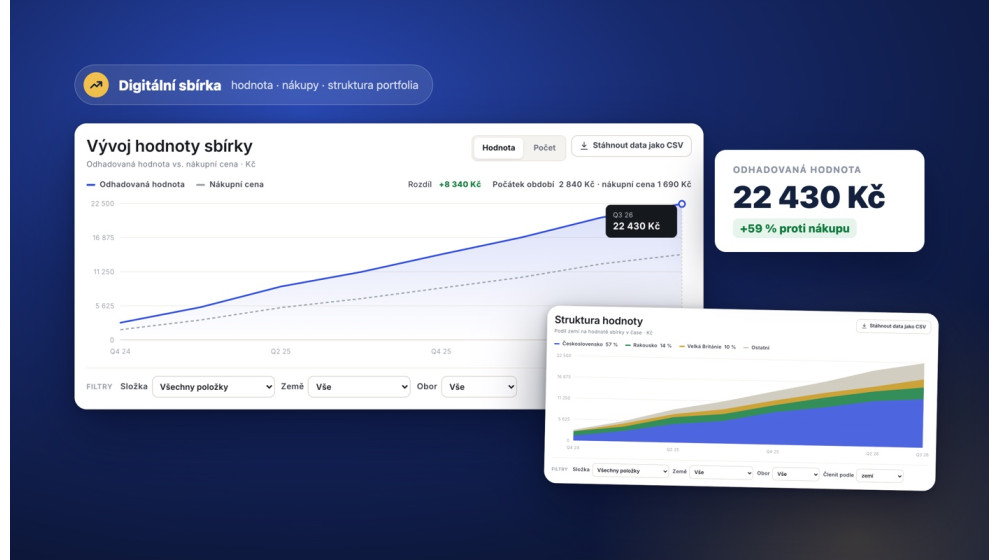
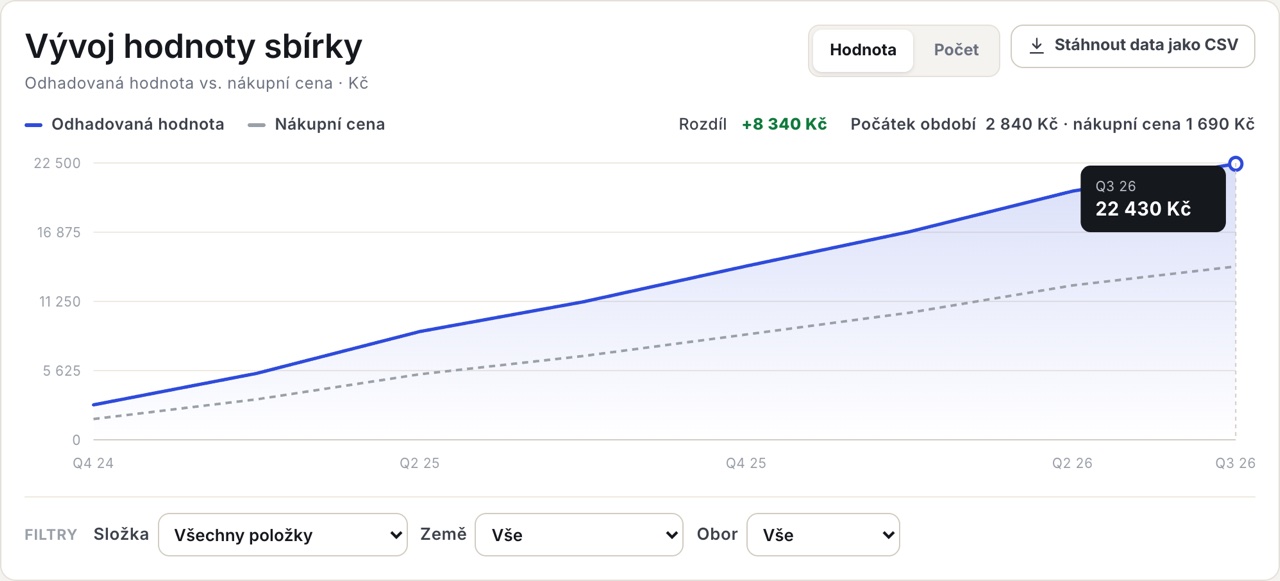
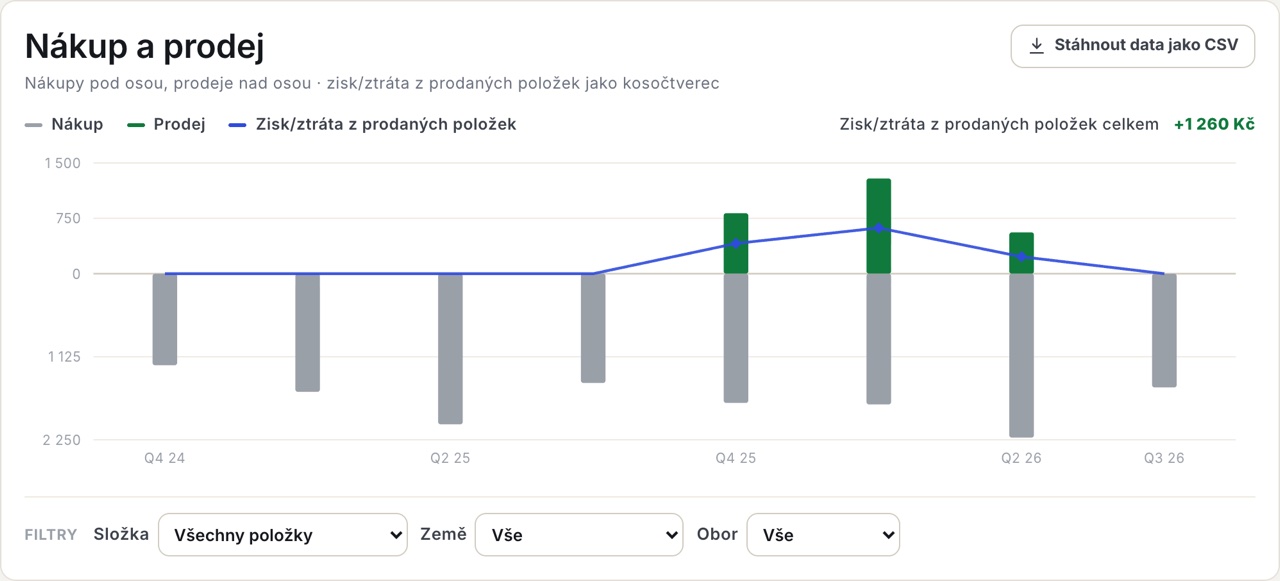
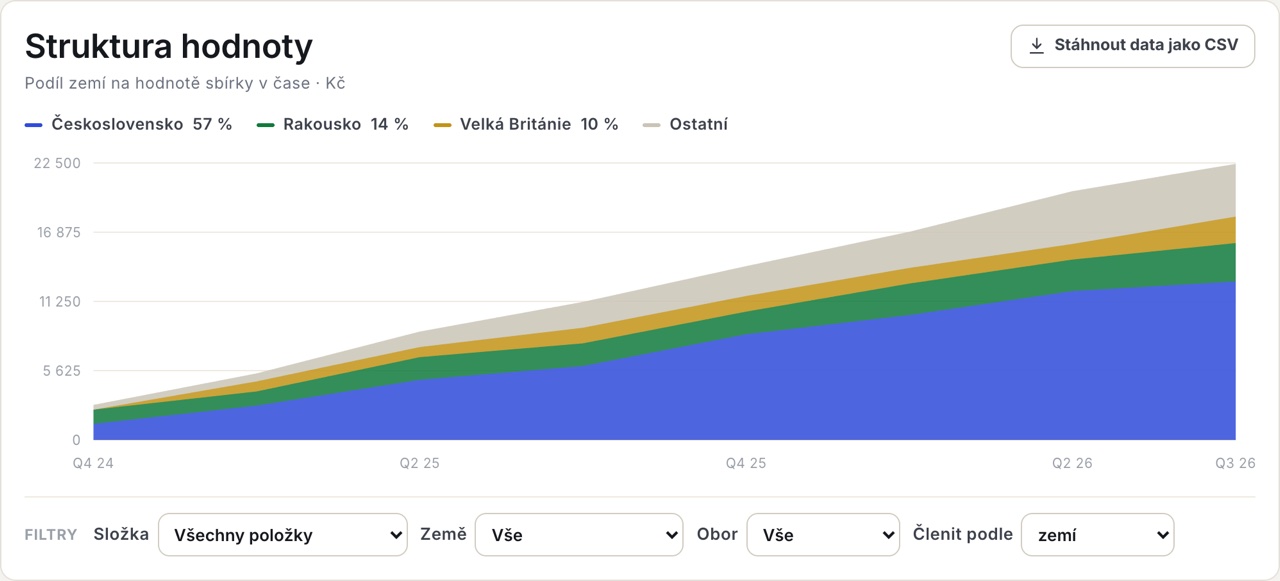
One of the biggest advantages of a digital inventory is being able to follow how your collection develops. At the top of the Statistics tab there are four summary figures — Estimated value, Purchase price, Gain and the number of items — and below them you can switch between four charts:

1. Collection growth — estimated value against purchase price over time. The gap between the two lines is your unrealised gain. A toggle shows the same in pieces instead of in korunas.
2. Buying and selling — purchases are drawn below the axis, sales above it, and the line shows the profit/loss on sold items: the selling price minus what you paid for those particular pieces. At a glance you can see the months when you were only buying and the months when the collection started to pay for itself.
3. Value structure — how the share of individual countries in the collection's value has changed over time. You can also break it down by field or by set, which card collectors will appreciate.
4. Profit by cohort — items are grouped by month of purchase, and the money invested is set against realised sales from the same cohort. Next to the chart you can see how many items you bought, how many of them you sold and how many remain (Bought / Sold / Remaining), plus the profit or loss on those sold. It answers the question of which buying waves have paid off and which are still sitting in the album.
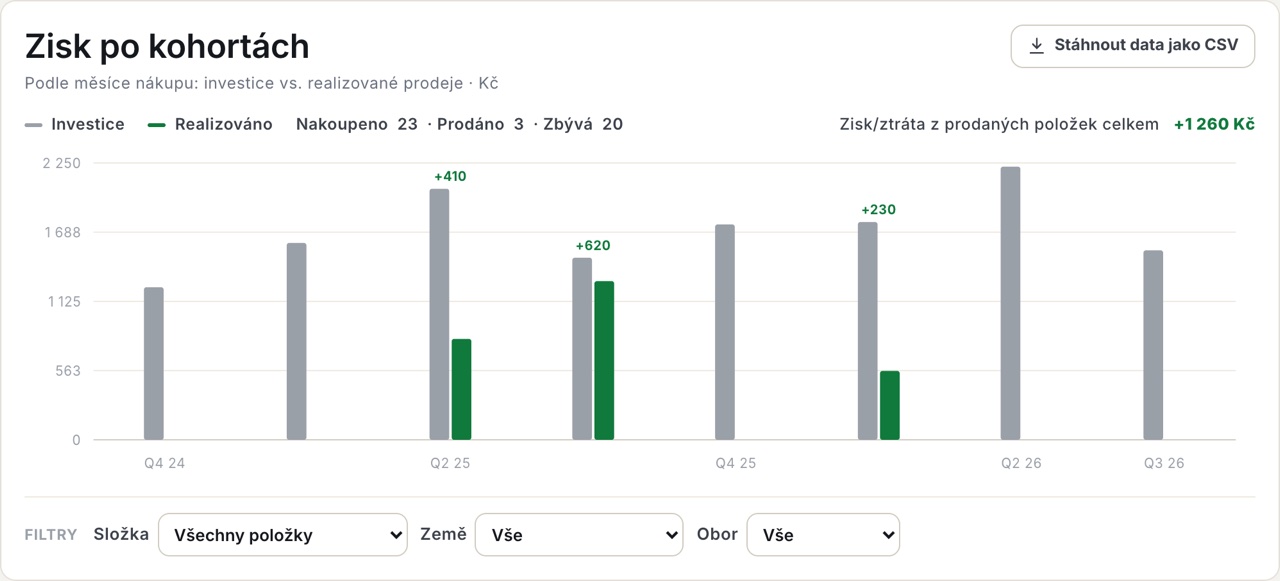
Each chart can be limited to a period (3, 6, 12, 24 months, all or a custom range) and filtered by folder, country and field. You can get the data from any chart via Download data as CSV.
Only items with prices filled in are included in the statistics — which is why the heading always states how many items the figures are based on.
How often should you update the value of your collection?
There is no need to revalue every stamp every month.
It is more practical to divide the collection by importance:
The most valuable items
Check them more regularly and whenever there are significant changes in the market.
Items of medium value
Update them, for example, during a regular review of your collection.
Common and cheap stamps
There is no need to keep adjusting their value by hand. This is where automation is useful, so you can focus your time on more important items.
This approach greatly reduces the amount of work while keeping a good overview of what really matters in your collection.
What to do with an old stamp collection?
Digitisation is especially useful for older or inherited collections, which often lack information about:
- when a stamp was acquired,
- how much it cost,
- where it came from,
- whether it has ever been valued,
- or how the whole collection is actually organised.
With an old collection there is no need to start by fully cataloguing every item.
We recommend first:
- separating out potentially valuable items,
- documenting their condition,
- photographing them,
- determining the basic catalogue details,
- finding out an approximate value,
- only then continuing with the more ordinary parts of the collection.
This is exactly where AI can significantly speed up the first stage of identification.
How to catalogue stamps with Znamky.cz?
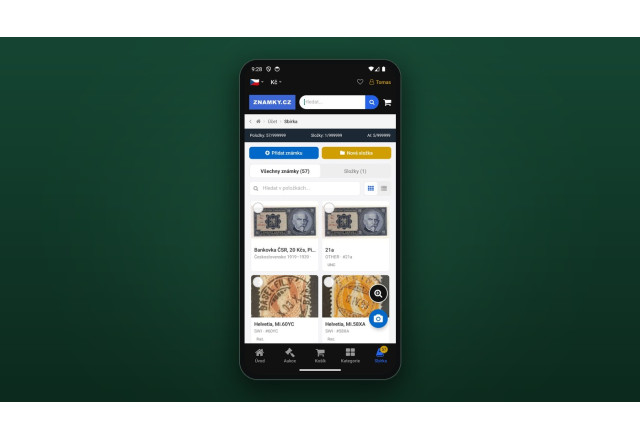
The Collections & exhibits section is in the account of every registered user and combines photos, AI recognition, catalogue data, purchase information, folders and collection statistics.
It is built around two screens:
- Item list — all your stamps and other items in one table with a photo, catalogue number, country, condition, folder and estimated value. You can filter by country, catalogue, condition, field and folder, and sort by any column.
- Folder (collection) list — an overview of your collections as cards with a mosaic of thumbnails, the number of items and their total value. Clicking a card opens the items in that collection.
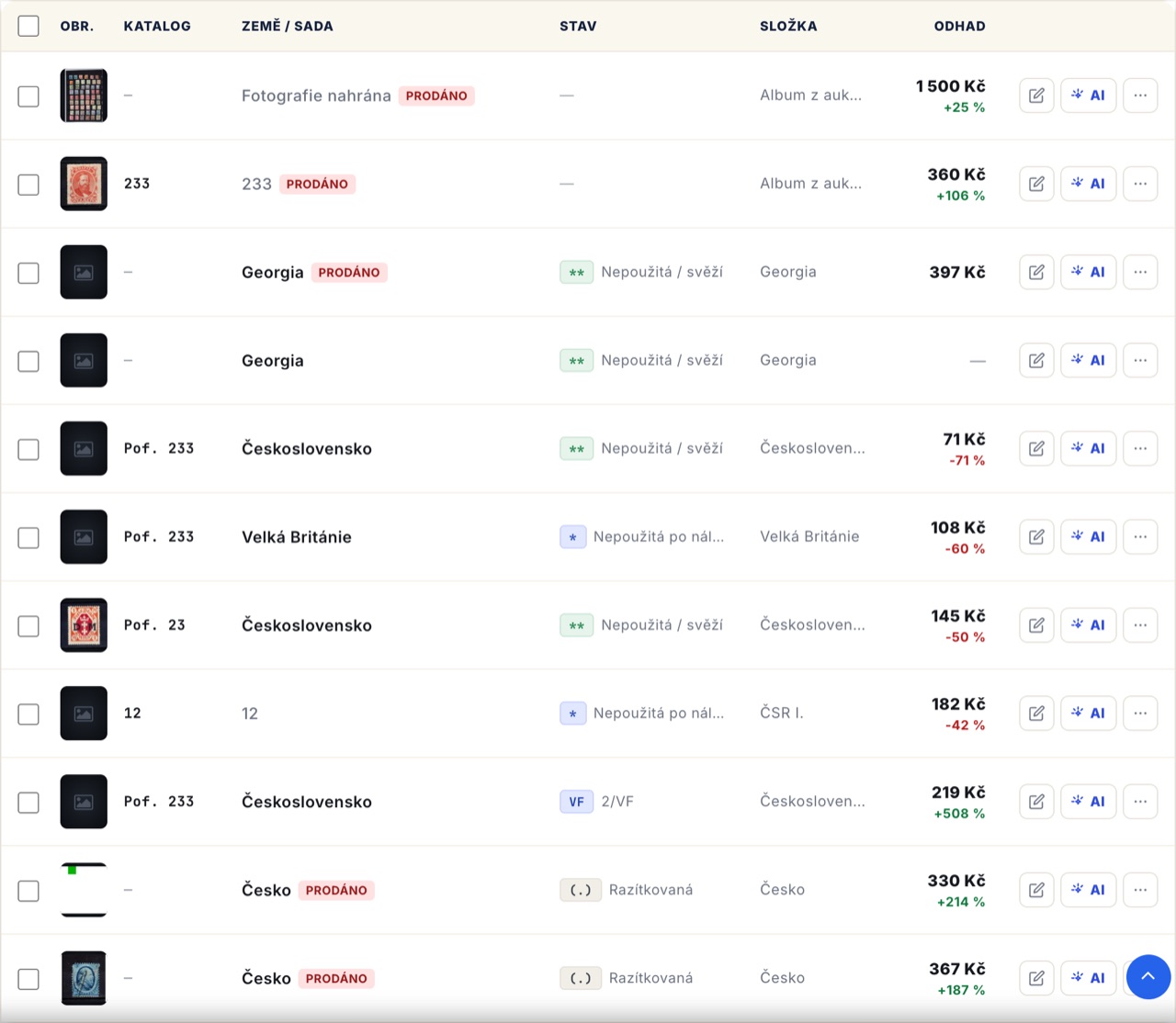
This means you can work in different ways depending on the type of stamp.
For common items, for example:
photo → AI recognition → check → sort into collection
For more valuable items:
photo → AI recognition → catalogue check → check of condition and variety → adding prices and other details
And if you buy stamps online, you can also create the basis of your record directly from the purchase details.
You do not have to record only stamps — it works just as well for banknotes, coins, trading and sports cards and other collectibles. The available fields and catalogues change according to the field you choose.
Cataloguing on your phone
The most practical way to add items is with a mobile phone. You photograph stamps right next to the album and upload them to your collection through our mobile app — you can then finish the detailed record on your computer, where prices, condition or notes are more comfortable to fill in. Both feed into the same collection, so you never retype anything twice.
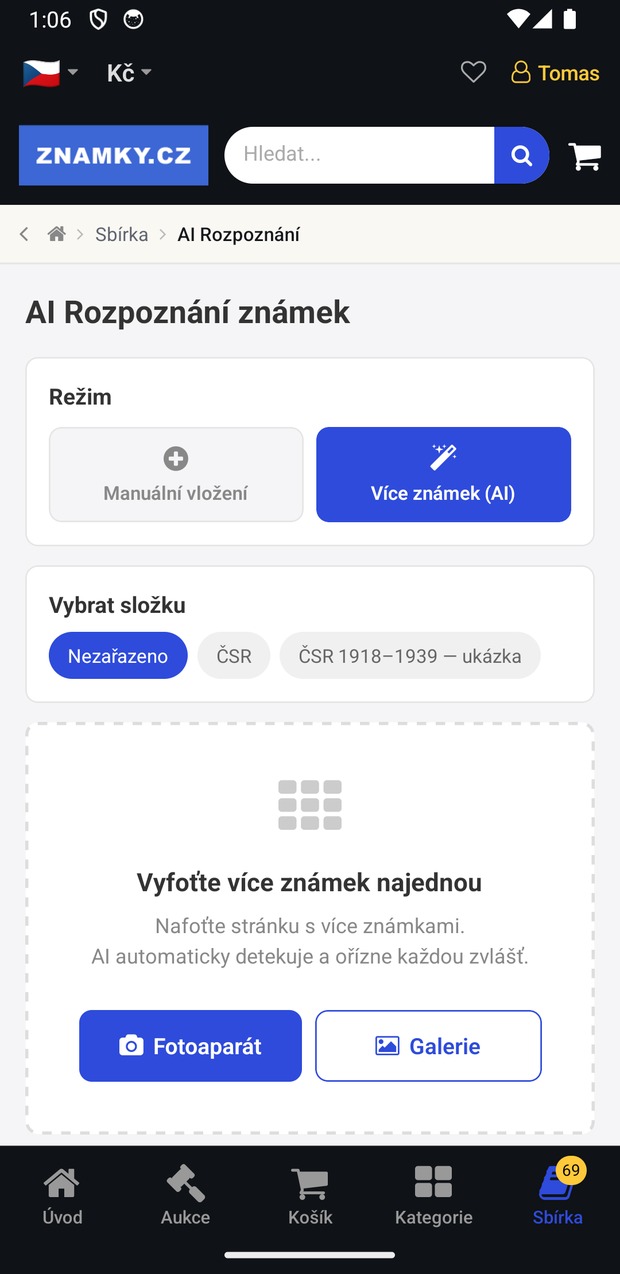
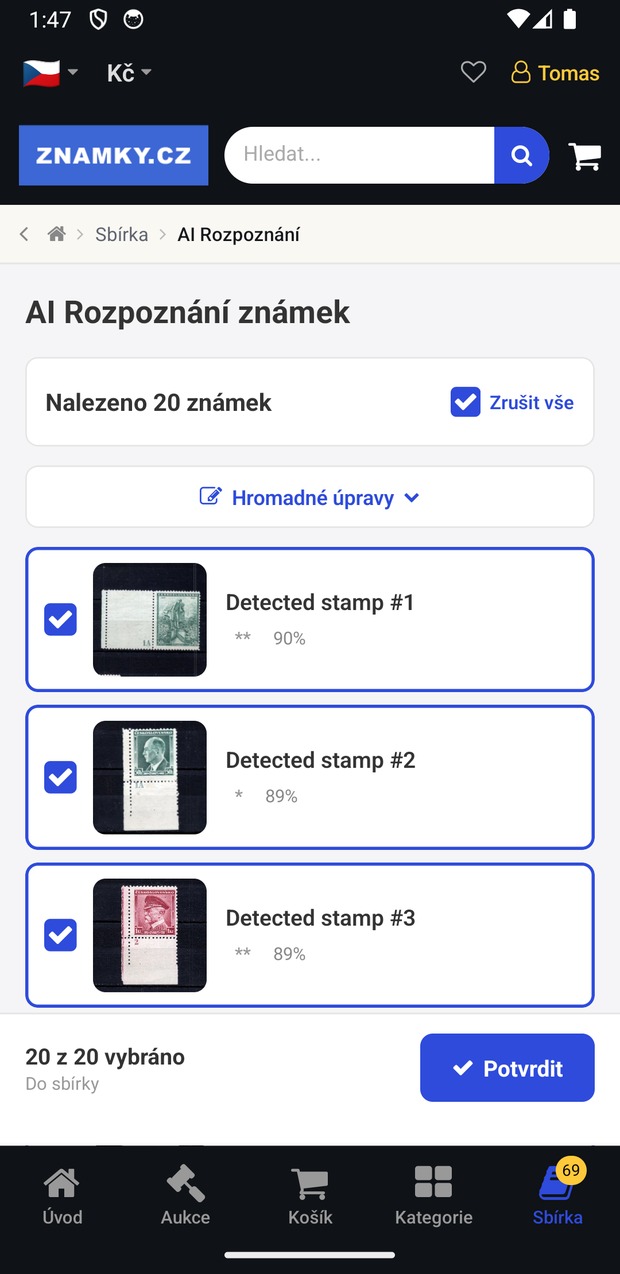
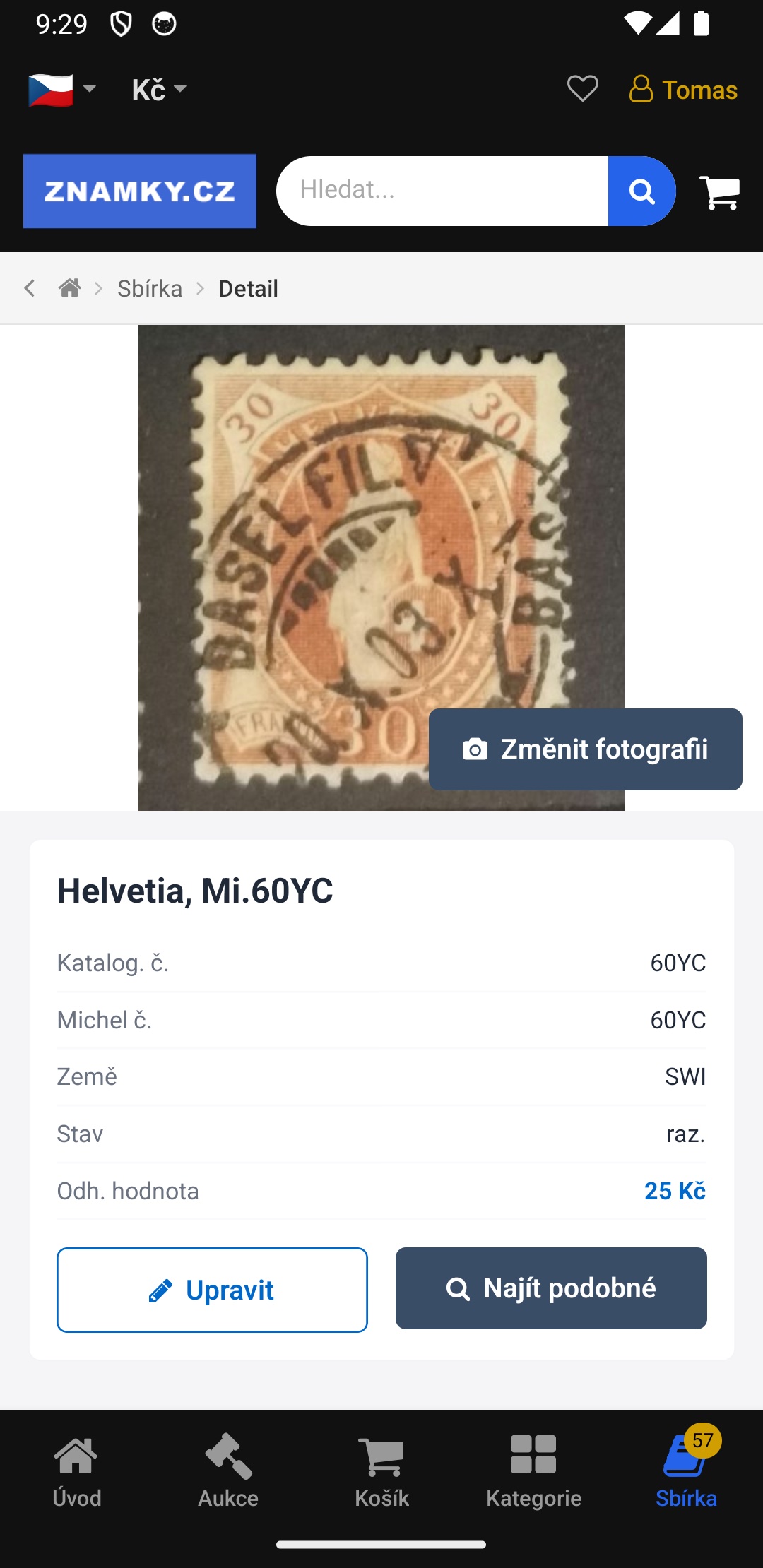
The app also lets you work with your collection while browsing or buying stamps.
You can use your phone, for example, for:
- photographing stamps,
- AI identification,
- checking details,
- working with folders,
- browsing your collection,
- or recording new additions.
This is handy, for example, when visiting a stamp fair, an exhibition or an auction, or when sorting through boxes of an old collection. The app is free for Android and iPhone — you will find details on the stamp collecting mobile app page.
Bulk edits save you the most time
With hundreds or thousands of items it is not efficient to edit each stamp individually.
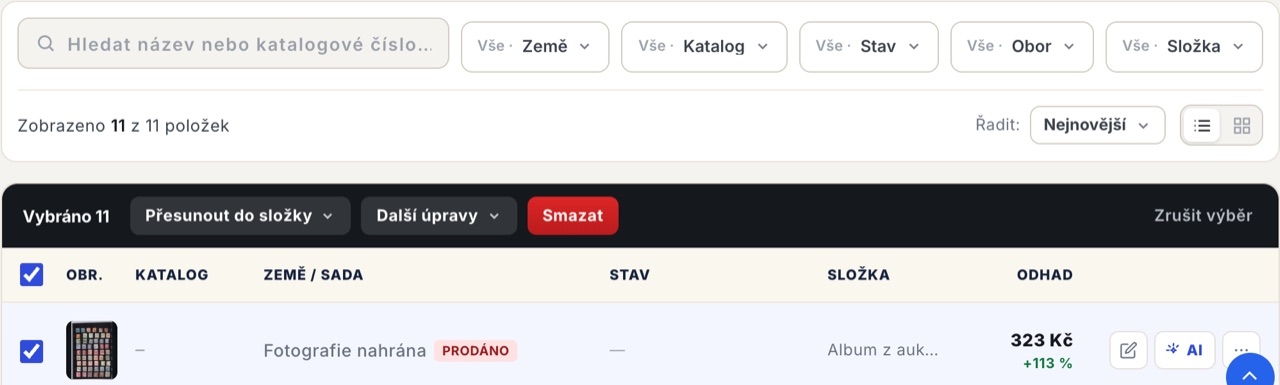
Ticking items opens a bar with bulk actions. If you want to work with the entire filter result, not just what is visible on the page, the option select all N matching the filter is offered.
You can then, all at once:
- move items to an existing folder,
- create a new folder from the selection,
- split the selection by country,
- fill in the country, catalogue or condition,
- value items as a "common stamp" — the selection is given an estimate of CZK 1 in bulk,
- mark items as sold,
- delete them.
Valuing as a common stamp is useful for bulk and cheap pieces: you do not have to estimate a price for each one separately, yet the items have a value filled in and are counted correctly in the statistics. Just be aware that the action overwrites any existing estimate — which is why, before you confirm, it shows how many items it affects.
A typical example is when you import an album of two hundred pieces, have them split by country and then only add prices for the ones you want to track.
Sharing your collection and exhibit selections
A digital inventory can also be a way of presenting your collection. In the collections in your account and in our mobile app you can easily share your collections — just create a link and send it, for example, to friends and fellow collectors. They will see the selected folder including photos, without you having to send anything by e-mail. And you can switch sharing off again at any time.
In addition, there is a separate Exhibits tab where you put together exhibit pages from your recorded items — for example a collection devoted to a particular country, period or theme.
You can use such a selection when:
- planning an exhibition,
- presenting your collection,
- communicating with other collectors,
- preparing for a sale,
- or handing the collection over to your family.
And if you are selling your collection, it can be exported directly into formats for Catawiki and eBay — alongside standard CSV and XLSX.
How long does it take to digitise a collection?
It depends mainly on the size of the collection and the level of detail you want.
| Method | Time per item | When it is suitable |
|---|---|---|
| Importing purchases | a few seconds | Everything you bought through the supported marketplaces |
| CSV / XLSX import | a few seconds | Migrating from a spreadsheet or another program |
| Photo of a whole page + AI | tens of seconds | Large volumes from an album |
| Manual entry | minutes | Rare pieces, varieties, items with notes |
With a few dozen stamps it may be possible to create a detailed record within a few hours. With hundreds or thousands of stamps it is better to work in stages:
Stage 1: the most valuable and most interesting items
Stage 2: other more valuable stamps
Stage 3: common items using AI and automation
Stage 4: ongoing additions and updates
The important thing is not to start by wanting to record absolutely everything perfectly straight away.
The 6 most common mistakes when cataloguing a collection
1. Trying to record everything in the same detail
For a cheap stamp it may not make sense to spend several minutes filling in details by hand that you can get automatically.
2. Not recording the purchase price
Without it, you will find it hard to work out later how much you have actually invested in your collection.
3. Confusing catalogue value with market price
The catalogue is an important source of information, but catalogue value is not automatically the amount you will sell a stamp for.
4. Not keeping photos
A photo helps not only with identification but also with documenting condition and making comparisons in the future.
5. Not recording the purchase date
The date is important for tracking price developments and the history of your collection. If you do not fill it in, the date you added the item to your collection is used instead — and the portfolio chart loses accuracy. You can also add it retrospectively.
6. Keeping putting off digitisation
The bigger the collection, the harder it is to reconstruct it after the fact. But there is no need to wait for a perfect system. Start with the most valuable items and gradually add more.
FAQ: Frequently asked questions about keeping a digital stamp inventory
What is the best way to catalogue a stamp collection?
The most efficient approach is to combine a digital catalogue, photos, AI and manual checking. Valuable stamps are worth recording in detail, while for common items it makes sense to use as much automation as possible.
Do I have to enter every stamp by hand?
No. For a larger collection it is better to use photos and AI, purchase imports and bulk edits. Keep manual work mainly for valuable items or those that are hard to identify.
How do I find out the value of my stamp collection?
Start by identifying your stamps and their condition. Catalogue value can serve as a reference figure, but to estimate the real value, the current market situation, the stamp's condition, rarity and demand are also important. A digital inventory calculates totals from the values you enter — it does not replace a professional valuation.
Is catalogue value the same as the selling price?
No. Catalogue value is a reference figure from the catalogue. The actual market price can be very different and depends on the specific stamp, its condition and current demand.
Can I record things other than stamps?
Yes. In addition to stamps, banknotes, coins, trading and sports cards and an "other" category are supported. The available fields and catalogues change according to the field you choose.
Can anyone else see my collection?
No, not unless you share a specific folder via a link yourself. Statistics and prices are always yours alone.
Will I lose my data if I stop using the inventory?
No. You can download your collection at any time as CSV or XLSX in the Export tab, including prices and catalogue numbers.
What if I have an old or inherited collection?
Start with potentially valuable items. Photograph them, try to determine the catalogue details and record their condition. Only then continue with the more ordinary parts of the collection.
How often should I update my collection?
The most important thing is to record new additions as you go. For more valuable items it also makes sense to check their estimated market price regularly. For common stamps there is no need for frequent manual revaluation.
A digital inventory should above all save you time
The aim of a digital inventory is not to create more paperwork but, on the contrary, to gain control over your collection and save time.
The most efficient approach is therefore simple:
Check valuable items in detail. Process common items as automatically as possible.
Thanks to photos, AI, purchase imports, bulk edits and statistics, you can gradually digitise even a very large collection without having to retype every detail by hand.
Once your collection is catalogued digitally, you will not only have an overview of what you own but also much better grounds for further purchases, selling stamps, valuing your collection, insuring it or eventually passing it on to the next generation.
Start digitising your collection
Photograph your first stamps, get help identifying them and gradually build your own digital catalogue — the Collections & exhibits section is free for registered users.
We write in detail about recognition from photos in the article How to use AI to sort stamps and build a digital collection.
Every stamp has its own story.